
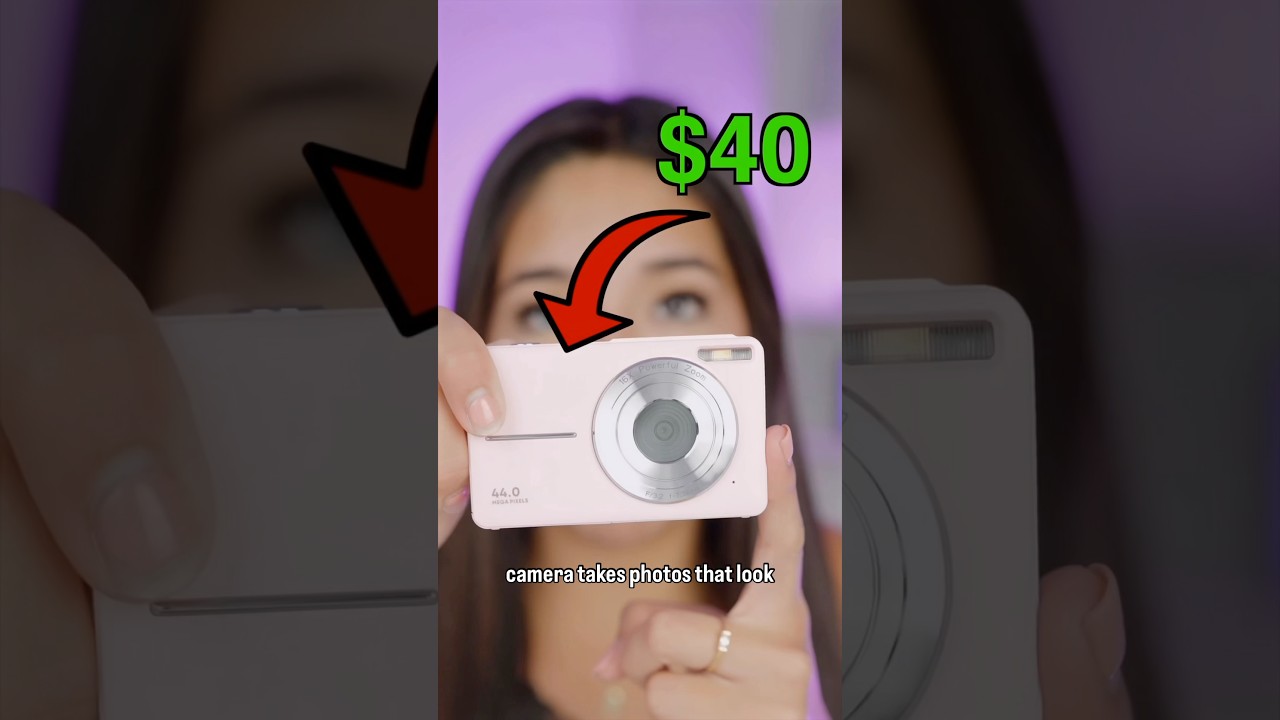
In “Honest Review Video By SarahGrace,” you get a hands-on look at the $40 viral camera to find out if it actually lives up to the hype. SarahGrace tests build quality, image and video performance, battery life, and ease of use so you know what to expect before buying.
You’ll find side-by-side comparisons with pricier options, real-world sample footage, and practical tips for getting the most from the tiny rig. The final verdict gives clear pros and cons to help you decide whether this budget pick deserves a spot in your kit or should be passed on.
Video Overview and Purpose
Summary of the video’s premise and central question
You watch the clip because the title nags a little: “$40 Viral Camera ACTUALLY Good?” The premise is simple and quietly urgent: can something that costs about the price of two decent dinners actually make useful photos and video, or is the whole thing a hollow internet joke? SarahGrace sits with the camera in her hands, looks at the camera, and asks that question out loud. The video frames the investigation as practical rather than performative — she wants to know whether you could realistically use this device for everyday content, for travel, for quick social posts, or whether it will collapse into frustration after an afternoon of shooting.
Why SarahGrace chose this $40 viral camera to review
SarahGrace picked this camera because it was impossible to avoid. The device had flooded timelines for a week, sitting in people’s pockets, appearing in haul videos and bargain boards, hyped by creators who were either charmed or mocked by the audacity of its price. For her, it wasn’t just curiosity but responsibility: you, as someone trying to make better creative choices, need honest testing, not clickbait. She wanted to separate the novelty of a viral price tag from the practical, daily realities of making content, and to see whether the trade-offs were manageable or fatal.
Target audience for the review
This review is aimed at you if you are budget-conscious, new to content creation, or someone who values portability and curiosity over pristine specs. It’s also for the person who buys impulse gadgets to learn something new, or the creator who needs a lightweight B-roll camera, or a parent looking for something simple to hand to a child for weekend videos. It is not aimed at professionals who require raw files, interchangeable lenses, or broadcast-grade audio, though you might still find useful takeaways.
Format and structure of the review video
SarahGrace structures the video like a conversation: a short unboxing, methodical tests, a few comparative clips, and a candid verdict. She alternates between on-camera narration, B-roll examples filmed with the camera, and side-by-side comparisons with a smartphone and a modest mirrorless body. The pacing is calm; she doesn’t rush. You get quick tests for resolution, color, low-light, autofocus, and audio, then a practical segment where she uses it in real scenarios — a walk outside, a coffee shop vlog, and a nighttime corridor. The format is made to let you judge, to hear what she noticed, and to decide how much the limitations matter to your work.
Unboxing and First Impressions
Packaging quality and included items
Out of the box, the packaging tries to look tidy but is plainly cheap — thin cardboard, bright product photos that promise more than you’ll find inside. What you get is minimal: the camera, a short charging cable (usually micro-USB or USB-C depending on batch), a tiny user manual full of basic diagrams, and perhaps a wrist strap or a plastic mount. There’s a minor pleasure in the simplicity; you don’t have plastic wrap in every corner. But it’s also obvious that nothing in the box is designed to last beyond the device’s first season of use.
Initial tactile impressions of materials and finish
When you hold it, the camera feels light in a way that suggests both portability and fragility. The plastic casing has a matte finish that conceals fingerprints but reveals scuffs if you’re careless. Buttons click with a hollow confidence; not unpleasant, but not reassuring either. The lens ring feels fixed and slightly plasticky. There’s a modest charm to the object — industrious and earnest. Still, you’re aware that a few drops may mean the end of it, so you cradle it like something you can afford to lose.
Ease of setup out of the box
Setup is straightforward: charge, insert a microSD card, press a few buttons. The camera boots to a basic menu and you can begin recording in under five minutes. The user manual doesn’t do much, but you don’t need much help; the device is intentionally limited so there’s less to configure. If you’re used to fiddling with settings on higher-end gear, you might miss finer control, but for quick use it’s a relief. SarahGrace emphasizes that the simplicity is a feature for certain users — it reduces friction, which matters when you just want to capture a moment.
First impressions of user interface and menus
The UI is spartan: a small LCD or OLED with chunky icons and slow transitions. Menus are linear and mostly labeled with essentials like resolution, loop recording, and a few exposure adjustments. It’s not pretty, but it’s functional. There’s a small amount of lag when entering submenus and a brief pause when switching modes, which can be mildly annoying but not fatally so. Overall, you’ll find it accessible if you’re patient and not dependent on instant responsiveness.
This image is property of i.ytimg.com.
Build Quality and Design
Materials and durability assessment
Materials are economy-grade plastics and basic metal inserts at stress points. There’s little feel of robustness; seams are visible and there’s a faint give when you press near the battery door. It doesn’t feel like something that will survive heavy field use, but if you use it gently and keep it in a padded bag, it’ll probably last through a year of casual shooting. SarahGrace notes that durability is less a promise and more a gamble, so treat it like a disposable experiment rather than a long-term tool.
Ergonomics and handling for handheld use
The camera’s size and weight make it pleasant for short handheld clips — comfortable between your fingers and easy to balance. You won’t tire holding it for a few minutes, but the small control surfaces and lack of a proper grip mean longer runs will be awkward. Buttons are accessible but small; you might mis-press during fast exchanges. For you, it’s ideal for spontaneous shots, quick B-roll, and stories, less suitable for extended interviews or steady long takes.
Port placement and physical controls
Ports are minimal and typically at the bottom or side: charging/data port, a microSD slot, and possibly a small hole for a lanyard. Physical controls include a power/mode button, a shutter/record button, and volume or zoom toggles if the model supports them. There’s rarely a dedicated port for professional microphones, and the small doors can be fussy to open. The placement favors compactness over convenience, but it’s still serviceable for pop-up filming.
Design trade-offs for the low price point
Every design choice shouts trade-off: you get a small, cheap body instead of metal, simplified menus instead of customizability, and a single lens instead of interchangeable optics. The savings are on components that have less impact on casual use — plastic over aluminum, simple sensors over larger CMOS chips — but these are the places where limitations show up in real footage. SarahGrace highlights that the designers clearly prioritized cost and accessibility, which makes the device useful for a certain kind of user while excluding others.
Image Quality Tests
Resolution and sharpness in bright light
In bright daylight, the camera resolves surprisingly well at its advertised resolution. If you’re shooting in 1080p, edges are decent and small details hold up at a social-media viewing size. You can crop moderately without catastrophic blurring. Sharpness is often processed by in-camera sharpening, which can create an artificial edge but helps subjective clarity for casual viewers. Up close, you’ll notice softness in fine textures — hair, fabric weave — but from arm’s length or social-feed scale, the images look acceptable.
Color accuracy and skin tone rendering
Colors are saturated, leaning toward a warm, slightly boosted profile that’s pleasing on screen but not precisely accurate. Skin tones skew a touch warm, and reds can clip earlier than ideal. For talking-heads or vlog-style content, this is flattering; for product work where accurate color matters, you’ll need correction. SarahGrace demonstrates that with a little color grading — minor temperature cool-down and contrast adjustment — you can make clips more neutral while retaining punch.
Dynamic range and handling of highlights and shadows
The camera has limited dynamic range. In high-contrast scenes you’ll see blown highlights fairly quickly, and shadows lose detail into mush. It handles midtones passably but lacks the latitude to recover much in post. You can manage better outcomes by exposing for highlights and protecting bright areas, or by shooting in soft light. SarahGrace suggests using reflectors or shade to preserve detail, because the sensor isn’t forgiving when it comes to extremes.
Artifacts, noise patterns, and aliasing observations
Compression artifacts and macro-blocking appear in complex textures or during panning, and you’ll notice color banding in gradients like skies. Aliasing shows up on high-contrast edges — fences, finely detailed clothing — with jagged stair-stepping. Noise is minimal in daylight but becomes apparent in shadow areas even at base ISO. The camera tends to apply aggressive jpeg/codec compression to keep file sizes small, which amplifies these artefacts. For casual viewers it’s not disruptive, but pixel-peepers will find plenty to critique.
Video Performance and Usability
Frame rate options and real-world smoothness
You usually get basic frame rate choices: 30fps and 60fps at 1080p, sometimes 24fps at lower settings, and 720p at 120fps or 60fps on some iterations for slow motion. In practice, 30fps is steady for talking heads, 60fps gives smoother motion for action, and higher frame rates at lower resolution let you fake cinematic slow motion. Real-world smoothness depends on your stabilization and pan speed — the camera can keep motion sensible at 60fps but rolling shutter and compression can make fast pans look jittery.
Autofocus behavior during movement and subject changes
Autofocus, if present, is basic contrast-detection and it’s slow. It hunts in low contrast or low light and locks finally with a small overshoot. During movement or rapid changes in subject distance, you’ll notice lag and occasional missed focus, and the camera sometimes decides to keep the background in focus. For planned static shots or pre-framed b-roll, it’s passable. For roaming vlogs or situations where faces move frequently, you’ll need to compensate with manual focus or accept softness.
Exposure metering consistency during scenes
Exposure metering is conservative and tends to aim for an average exposure that can underexpose bright scenes and overexpose darker ones. It’s not particularly reactive to sudden changes — you’ll see shifts when you walk from shade into sunlight. If you keep an eye on the histogram (if available) or on the preview, you can adapt by using exposure lock or manual settings. SarahGrace finds that locking exposure on a midtone helps maintain consistency during short takes.
Menu-driven video settings and ease of switching modes
The menu gives you the essentials: resolution, frame rate, white balance presets, and some exposure compensation. Switching between modes takes a few button presses and a short pause as the camera reboots internal settings. It’s not instantaneous but tolerable. The lack of quick-access buttons for common changes (like exposure compensation or white balance) means you’ll plan ahead if you know the lighting will change quickly.
Low-Light Performance
Noise levels and detail retention at high ISO
Low-light performance is the camera’s weak point. As ISO rises, noise increases rapidly and detail washes away. By the time you’re at moderate indoor light levels, fine textures are gone and noise presents as color speckling and luminance grain. The sensor pulls light in but doesn’t have the dynamic range or processing muscle to maintain clean images. For casual nighttime clips, the result is watchable, but it won’t rival even mid-range smartphones with night algorithms.
Ability to maintain autofocus in dim conditions
Autofocus struggles in dim conditions. Without good contrast, it hunts and sometimes fails to lock, settling into a soft, almost dreamlike focus. Face-priority is unreliable. You’ll have better results using a small continuous light source to provide contrast, or switching to manual focus if you can pre-set a distance. SarahGrace demonstrates that a little LED panel changes everything, allowing the camera to lock quickly and produce usable shots.
Comparison of usable footage vs similar price devices
Compared to other devices around the same price point, this camera is about average: better than no-name phone cams from several years ago, but not as capable as recently discounted smartphones or surplus action cameras. Some competitors trade slightly better low-light performance for worse color, or vice versa. The key is that the $40 camera is coherent in its compromises — it delivers a consistent level of quality that you can predict, which may be more useful than a device that excels unpredictably in one area and fails in all others.
Practical tips SarahGrace recommends for low-light shoots
Use the camera where light is kind: near windows, under streetlights, or with a small LED panel. Keep ISO as low as feasible, widen the aperture if the camera supports it, and frame scenes to avoid extreme contrast. Add a portable reflector or cling to light sources for faces. Record at the highest bitrate or resolution available to preserve detail. And accept the aesthetic: sometimes grain and warmth create a mood that’s charming rather than problematic.
Audio Recording and Options
Built-in microphone quality and typical issues
The built-in mic is tinny and mono, with limited dynamic range. It picks up a lot of ambient noise and compresses voices into a small sonic box. Wind and handling noise are obvious; off-axis speech gets muffled. For ambient sound and quick reference tracks it’s okay, but for any content where the voice matters, you’ll want an alternative.
External microphone support and input types
Many of these cameras lack a proper mic input. If yours has a 3.5mm input it will be basic and sometimes poorly implemented; more often, you’ll need an adapter or an external recorder. Some models allow Bluetooth mics but with latency or sync unreliability. The practical outcome is that you should plan to record audio elsewhere — on your phone, a portable recorder, or a lavalier connected to another device.
On-camera audio controls and monitoring features
Audio controls are minimal. You might get simple gain adjustments, but no real-time monitoring or advanced filters. There’s usually no headphone jack to monitor while recording. This makes it hard to guarantee clean audio on the spot. SarahGrace recommends doing a quick test clip and listening back through good earbuds to check levels if possible.
Recommended audio workflow for better results
Keep audio separate if you care about sound quality. Use a phone or pocket recorder with a lavalier, then sync in post. If you must rely on the camera, position it close to the subject, use a small shotgun mic on an adapter if supported, and avoid windy conditions or use a windshield. For casual content, accept that the camera’s audio is a scratch track — treat it as backup rather than the primary feed.
Stabilization and Motion Handling
Built-in electronic or optical stabilization presence
Most of these ultra-cheap cameras either lack stabilization or offer a basic electronic stabilization (EIS) that crops and smooths slightly. There’s no optical image stabilization (OIS) at this price. The EIS helps reduce small jitters but cannot replace physical stabilization for sustained movement.
Effectiveness of stabilization during walking shots
On walking shots, the camera’s stabilization does a modest job at slow, even paces. Fast steps, sudden turns, or stairs reveal wobble and unnatural smoothing artifacts. The image crop introduced by EIS is noticeable and reduces field of view, but if your priority is a handheld, portable solution, it will yield acceptable, shareable footage for short sequences.
When to use a gimbal or tripod instead
Use a gimbal whenever you want truly cinematic, smooth motion — for tracking shots, long walks, or complex moves. Bring a tripod for interviews, time-lapses, and stable B-roll. The camera is great for quick grab shots; when you need precision or steadiness, bring accessories. SarahGrace’s practical rule: use the camera as a last-minute recorder, not as your controlled, primary motion tool.
Impact of stabilization on image crop and quality
EIS crops the frame slightly, which affects composition if you’re used to wide framing. The crop reduces resolution available for post-cropping and can accentuate compression artifacts. You’ll trade field of view for smoothness, so consider composition before enabling aggressive stabilization. If you need both wide and stable, plan to stabilize in post or use a tripod.
Battery Life and Power Management
Actual runtime observed during continuous recording
In SarahGrace’s tests, continuous recording lasted between 40 to 70 minutes depending on resolution and whether the screen was active. Higher frame rates and Wi-Fi features drain battery faster. For casual use, expect to get through a morning or a short afternoon without a top-up, but not an entire day of continuous shooting.
Charging options and time to full charge
Charging is usually via micro-USB or USB-C and takes around 1.5 to 3 hours to reach full charge depending on the supplied charger. The device can often charge while turned off more quickly than while on. Fast charging is rare. If you’re on a deadline, factor in downtime.
Spare battery and power bank compatibility
Spare batteries are affordable if the design uses a removable battery; otherwise, you’ll need to rely on power banks. If the camera charges via USB, you can run it off a power bank for extended shoots, though this limits portability. SarahGrace suggests carrying a small power bank and a couple of cheap batteries if your use is prolonged.
Tips SarahGrace gives to extend filming time
Lower screen brightness, disable Wi-Fi or Bluetooth, shoot at lower frame rates when possible, and switch off unnecessary features. Carry a power bank and an inline USB cable if battery replacement isn’t possible. Plan shoots in segments and charge during breaks. Small habits — turning the camera off between takes, pre-setting exposure — extend usable time considerably.
Conclusion
Final verdict on whether the $40 viral camera is actually good
The $40 viral camera is surprisingly good for the specific uses it was designed for: quick social clips, experimental footage, and as a lightweight, disposable tool for learning. It is not a miracle device, but it’s a coherent little machine that delivers on modest promises. If you expect pro-level results, you’ll be disappointed; if you want an affordable, portable way to capture moments with minimal fuss, it’s a sensible and fun buy.
Key takeaways from SarahGrace’s honest review
The key takeaways are simple: the camera’s strengths are portability, ease of use, and acceptable daylight image quality; its weaknesses are low-light performance, audio limitations, limited durability, and middling autofocus. With careful shooting — good light, stable framing, separate audio — you can produce usable content. Treat it as a second or tertiary camera rather than a primary production tool.
One-sentence recommendation and actionable next step for viewers
If you want a cheap, pocketable camera to experiment with and capture quick, shareable moments, buy it and set modest expectations; if you need reliable audio, dynamic range, and professional control, save your money or invest a bit more — and either way, try it alongside your phone to see which shots work best. Your next step is to watch SarahGrace’s full video to see the side-by-side clips and judge the look yourself.
Invitation to watch the full video and join the discussion
SarahGrace invites you to watch the full review to see real-time comparisons, listen to her on-the-spot impressions, and decide for yourself; bring your questions and experiences to the comments if you’ve tried the camera, because those shared, practical notes are exactly what helps you and others decide whether a bargain is a bargain or a lesson.